Vendor campaign submissions, without the inbox

Send one invitation. Suppliers get it right the first time, online or in an Excel workbook they upload. The deadline keeps itself. When you decide, everyone hears once.

Unlimited supplier accounts on every plan. Your suppliers never pay.

This is decision season now

Your whole season, on one screen

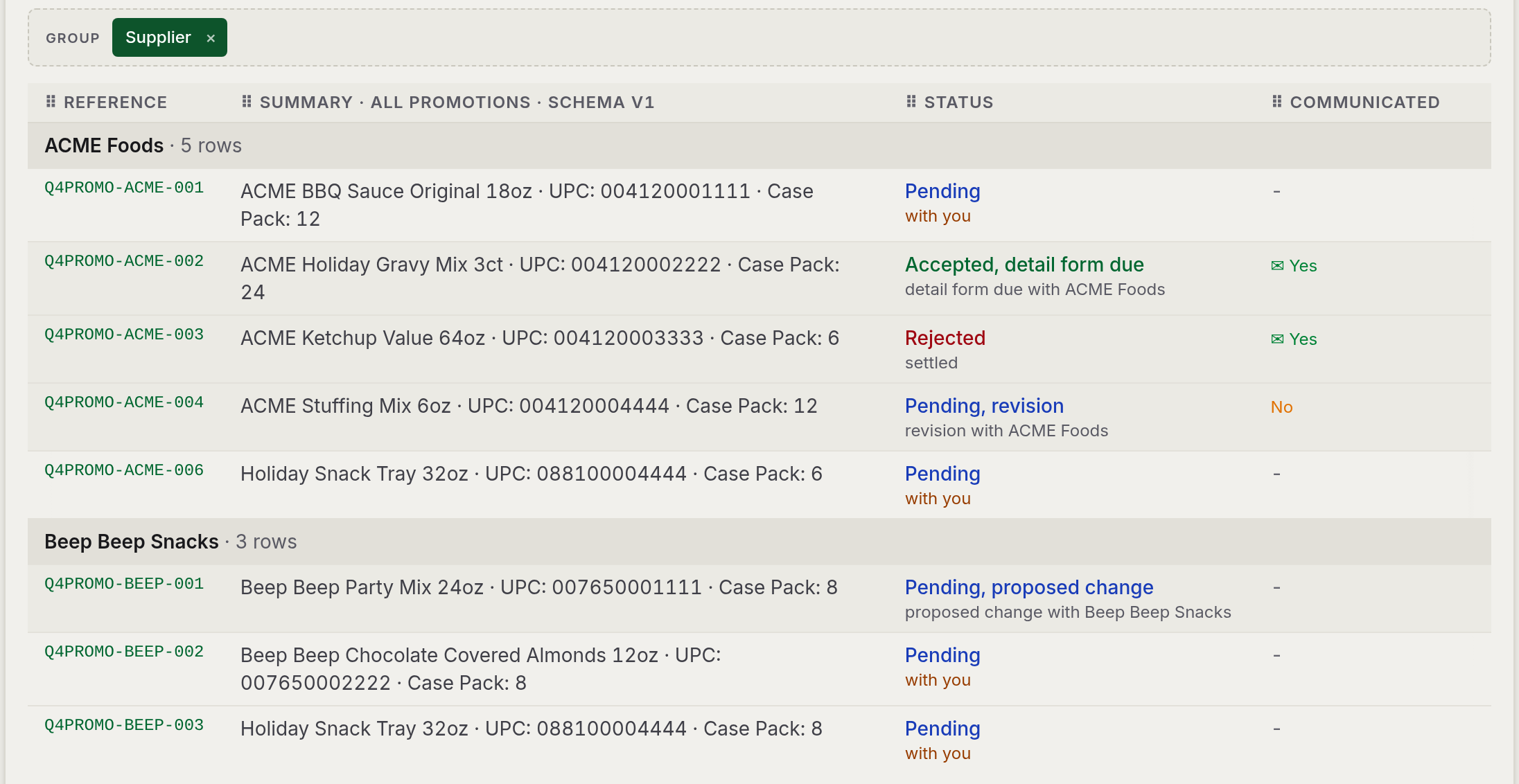
Every submission, grouped your way. What's decided, what's waiting, who's been told. Forty email threads, now one shareable link.

The buyer's review and decisions table, grouped by vendor with decisions in progress

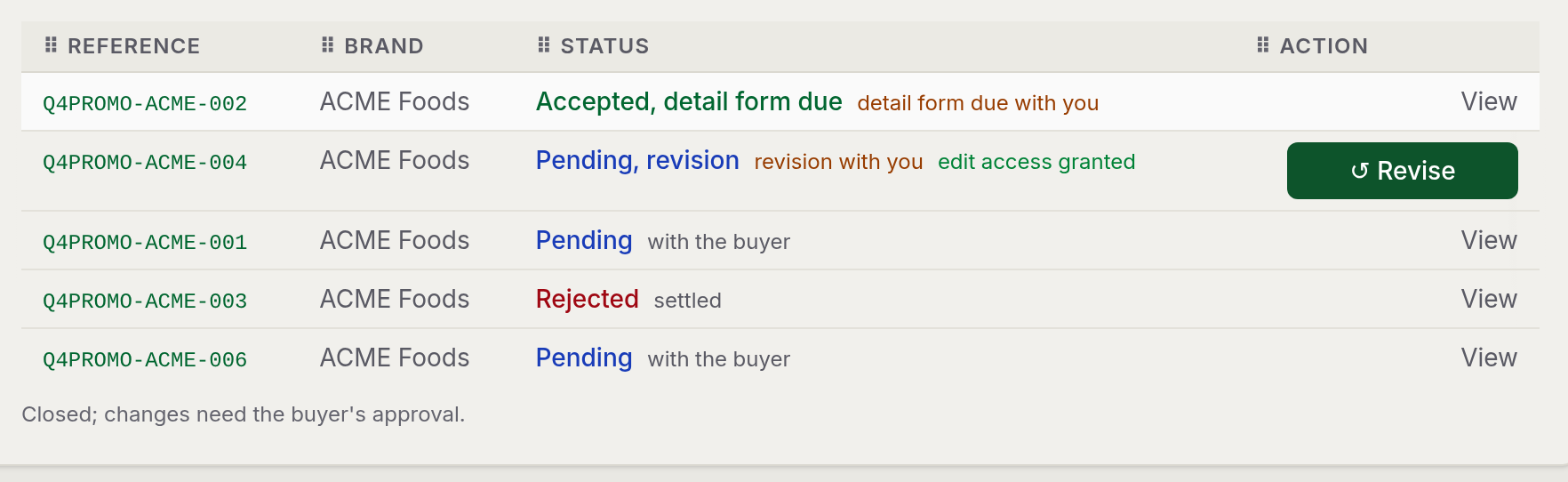
You both look at the same truth

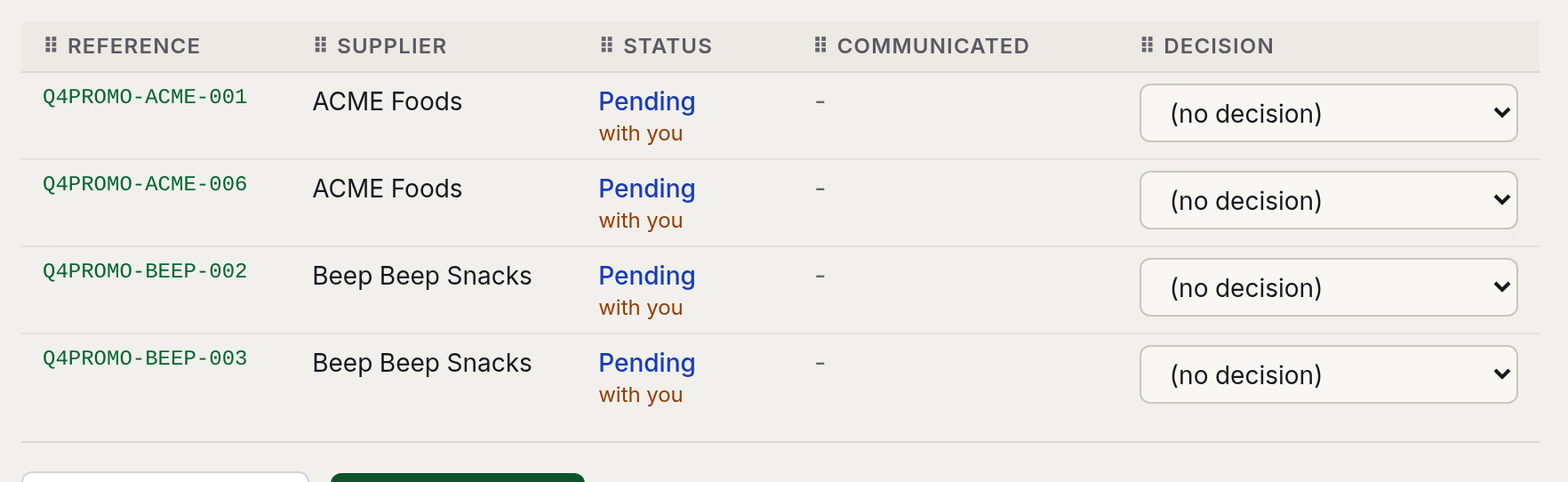
Drag the handle. What you decide is what your supplier sees, the moment you send it. No status calls.

The supplier's view of the same four items, each showing the status the buyer set The buyer's review table for the Q4 promotions campaign, with a status and a decision on each line

From setup to decision in four steps

1

Configure

Build the form once: the fields you need, a deadline, and automatic reminders. Save it as a template for next season.

2

Invite

Send one invitation. Each supplier sees only their own items, and a broker with five brands gets five separate views.

3

Collect

Suppliers submit online or upload an Excel workbook, both checked the same way. The deadline closes the campaign.

4

Decide

Accept, reject, or request a revision on each line, with a reason attached. Each supplier is notified once, when you send.

Everything the inbox could never promise

Clean data, however they send it

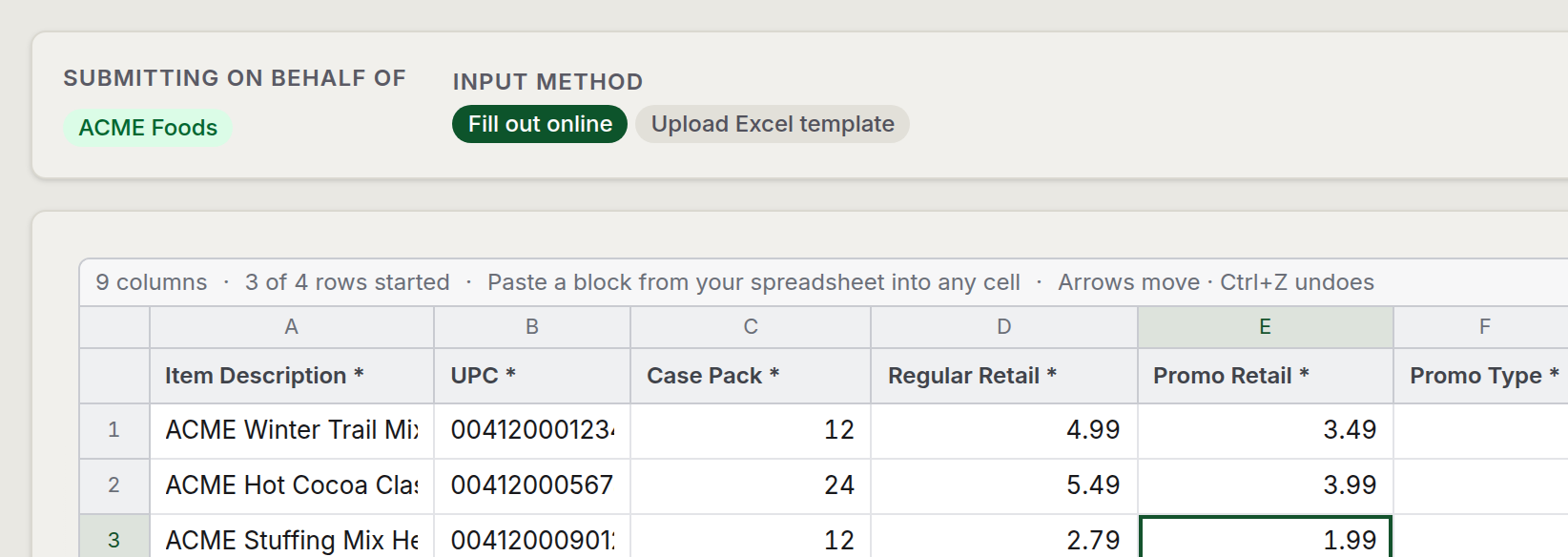
The grid, or the Excel they've used for twenty years. Same rules either way. You never retype a column again.

The supplier's online entry grid mid-entry, with the fill-out-online and upload-Excel-template toggle

Decisions that close the loop

Yes, no, or fix this, reason attached. Each supplier hears once. The Communicated column shows it's done.

Review table columns for status, communicated, decision, and reason, with decisions in progress

Deadlines that keep themselves

Reminders go out. The campaign closes on time. What needs you is one card with one button.

The action-required queue with two tasks, each with a single button

Nobody sees what they shouldn't

Brand isolation enforced in the data layer and proven by an adversarial test suite. Not a checkbox.

Answers in seconds, months later

Every action has a name and a time, every email is logged. Why was that line rejected in March? Search it.

Easy for them, powerful for you

Suppliers get a focused, plain-language view. Power users get the full registry. Anyone can switch anytime.

Pay for your team. Never for your suppliers.

Standard

For a single buyer or a small team

$15 /user/month

$12/user/month for teams of 3+

  • Full campaign workflow: build, invite, collect, decide
  • Excel round-trip with server-side validation
  • Automatic reminders and deadline auto-close
  • Revision requests and change proposals
  • Complete audit trail, email log, and one-click data export
  • Unlimited supplier accounts, free
Start a free 14-day trial

Enterprise

For large or regulated organizations

Custom

Negotiated per organization

  • Everything in Business
  • Self-hosted deployment option on your own infrastructure
  • Service-level agreement
  • Security review and questionnaire support
  • Dedicated onboarding, including supplier migration
Design your agreement

Every plan includes unlimited supplier accounts, virus scanning on every upload, and both interface views.

The questions buyers ask first

Do my suppliers have to pay or install anything?

No. Supplier accounts are free on every plan, unlimited, and browser-based. Suppliers who prefer Excel can do their entire submission in the generated workbook and upload it once.

What counts as a paid seat?

Internal users only, campaign managers and administrators, billed identically. You decide who holds admin rights; it never changes the price. Deactivating a user frees their seat immediately.

We have brokers who represent several brands. How is that handled?

Each brand is a separate tag, and a broker sees each brand's campaigns, items, and files strictly separately. The separation is enforced in the data layer and continuously verified by an adversarial test suite that tries to cross it.

Can our team sign in with our Microsoft accounts?

Yes, Business plans include single sign-on with Microsoft Entra ID, Okta, or Google. On a company-managed Windows machine that means signing in without ever seeing a password prompt. Supplier accounts use their own credentials with self-service password reset.

What happens to files suppliers upload?

Every upload is checked against an allow-list of file types, size-limited, and virus-scanned before it is stored. A file that cannot be scanned is refused rather than quietly accepted.

Is our data ours to take with us?

Always. Any administrator can download the whole workspace as one Excel workbook, campaigns, line items, suppliers, contacts, users, the audit trail, and the email log, at any time and on any plan. No request, no waiting period, no export fee.

Can we run it on our own infrastructure?

Yes. Enterprise agreements include a self-hosted option with a guided installer, health monitoring, and one-click updates, useful where procurement or data-residency rules require it.

See it with your own campaign

Bring a real promotion cycle and we'll run it end to end in a demo environment. Tell us a little about your team and we'll reply within a business day.